Groove Match
Groove Match listens to a track and finds others in your own library that sound like it, so you can fill a gap in a set by feel rather than by BPM and key alone.
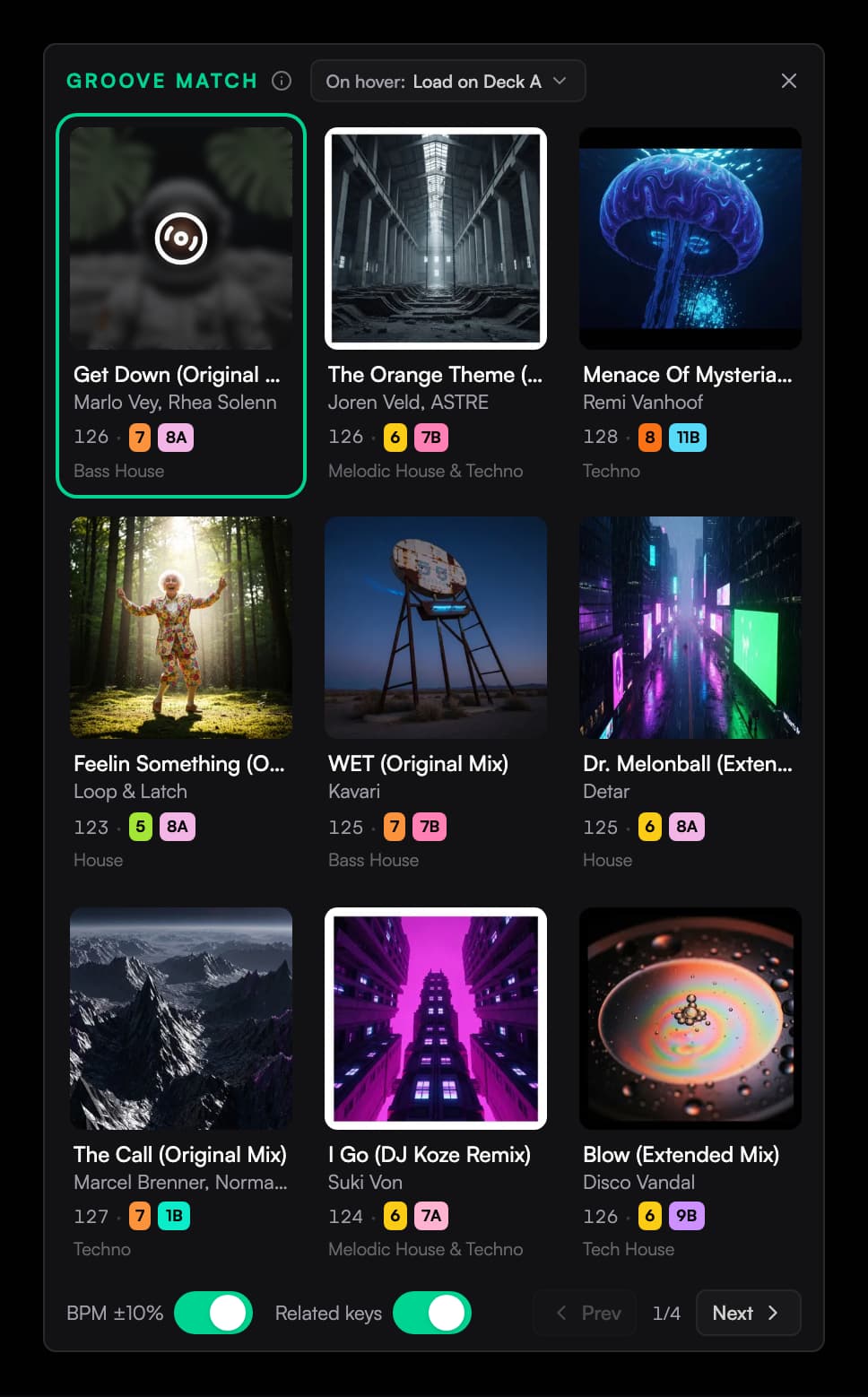
Groove Match suggests what plays next. It listens to the track before the slot you're filling and finds tracks in your own library that carry the same feel, energy, and rhythm. It's not matching genre tags or BPM, it's matching how the music actually sounds.
Filling a gap on the canvas
Hover between two cards in the Canvas or Cover art view and a green + appears in the gap. Click it and Groove Match opens with nine suggestions for that exact spot, chosen from the track before it. The + after the last card in a row is always faintly visible, so it's the easy one to find.
In the list view, hover a row and an Add track badge appears on the right. That fills the slot after that track.
Pick a card and it drops into place. Use the grid's On hover setting to choose how you audition suggestions.
The + affordances only show up on playlists you build by hand. A smart filter is defined by its rules, so there's no slot to insert into.
Browsing from the sidebar
Groove Match also lives in the library sidebar. Press L to open it, then switch it from Smart Filter to Groove Match. Choose what it listens to:
- List follows the track you have selected in the list.
- Master follows whatever is playing on the master deck, so suggestions keep up with your set as you go.
Choose what hovering does
The suggestion grid's On hover menu has three choices:
- Load on Deck A loads and plays the hovered suggestion on deck A. This is the default.
- Preview over Cue auditions through the headphone cue output. Preview stops when you leave the grid. Set up a separate headphone output in Audio setup.
- Do nothing leaves playback unchanged while you browse.
Ora DJ remembers this choice. Deck A playback continues when you leave the grid; cue preview stops. This setting is separate from the playlist toolbar's Hover Preview switch.
The filters
Two toggles sit at the bottom of the suggestion grid, and both start on:
- BPM ±10% keeps suggestions within a tenth of the seed track's tempo.
- Related keys keeps them in a harmonically compatible key.
Turn them off to widen the net. Nine suggestions show per page, and Prev and Next page through the rest.
The filters are strict. A track with no BPM or no key detected can't pass the matching filter, so it won't be suggested while that filter is on. If you're seeing fewer results than you expect, check the tracks are analyzed, or turn a filter off.
Before it can suggest anything
A track has to be analyzed before Groove Match can hear it. After analysis, Ora DJ listens through your library in the background and builds its index, one track at a time. This pauses while you're playing music, so it makes most of its progress when the app is idle.
You don't have to wait for all of it. Suggestions get better as more of the library is indexed, and new tracks join without a restart. Until a track is ready you may see:
- Building Groove Match... analyze your library first. The index is still being built.
- This track is not ready for Groove Match yet. The seed track hasn't been listened to yet.
- No matching tracks. Try turning off a filter. The filters are too tight for this seed.
Tracks already in the playlist are left out of the suggestions, as are files that have gone missing and exact duplicates of the seed.
Related
Quick listen
Turn on Hover Preview to audition tracks by hovering them in the Canvas or Cover art view. Ora DJ loads each track onto deck A and plays it from its first groove.
Performing
Rehearse a planned set in Ora DJ. Choose a deck view, mix on two or four decks, split a track into stems, and set up your audio output.