Filtering
Narrow your Ora DJ library by BPM, key, tags, and genre to surface the right tracks while planning, and combine filters to find exactly what fits.
Filtering helps you focus your library on exactly the tracks that fit the moment you're planning for. Ora's Smart Filter matches your library against a reference track, the one you have selected or loaded on the master deck, so the tracks that surface are the ones that will actually blend with it.
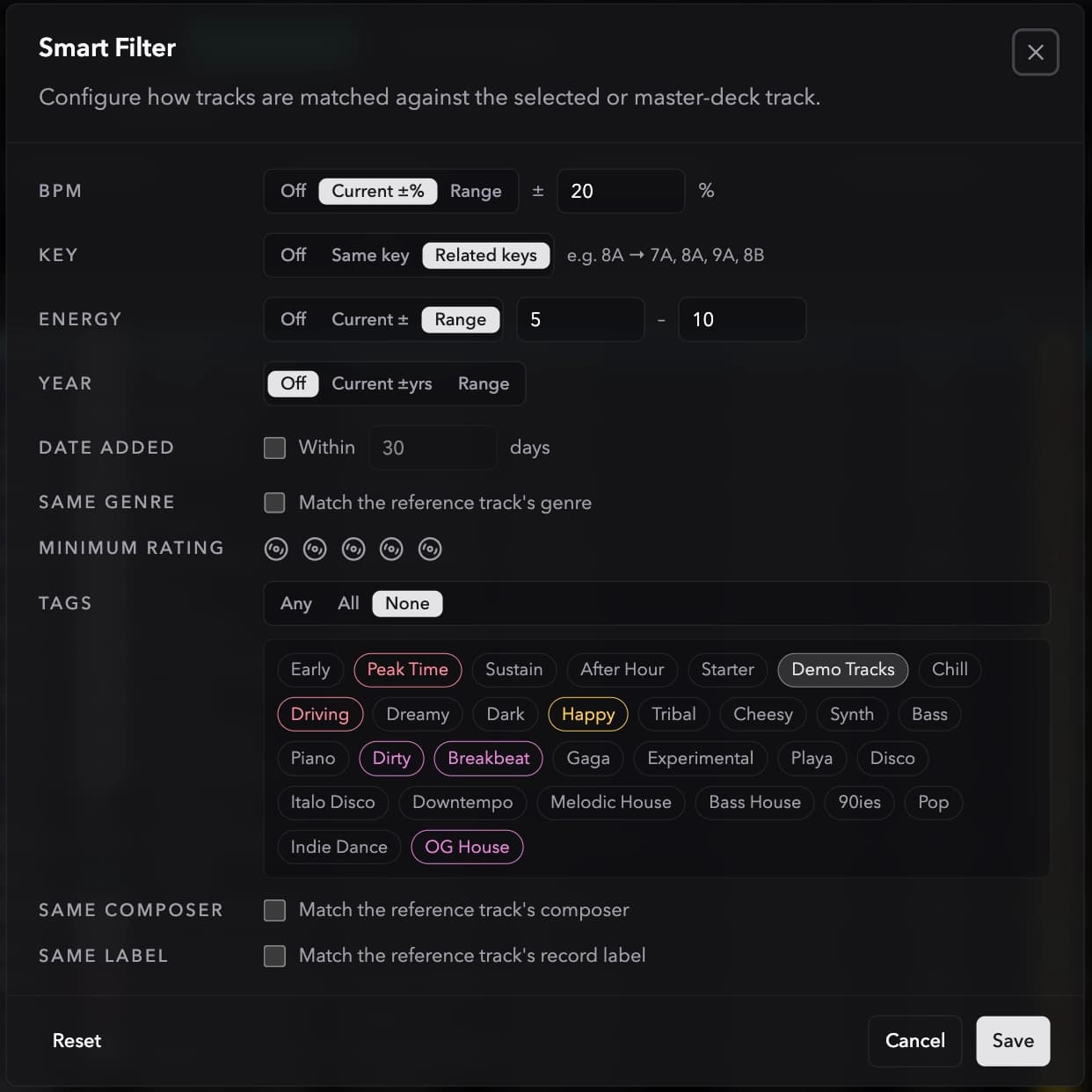
Filter options
- BPM range: show tracks within a tempo window.
- Key: show tracks in a specific key or harmonically compatible keys.
- Tags: show tracks matching one or more tags.
- Genre: filter by genre metadata.
Combining filters
Filters stack. For example, set a BPM range of 122–126 and a compatible key to find tracks that will blend smoothly with the one you're mixing out of.
Save as dynamic playlist
When at least one filter is active, the filter dropdown shows a Save as dynamic playlist action next to Clear all filters. It opens the dynamic playlist editor pre-filled with rules that match your current filters: key, genre, BPM, energy, rating, release year, date added, play count, and tags all carry over. Review the rules and save to create a playlist that updates itself as your library changes.
The free-text search box is not carried over, since dynamic playlists match on track metadata rather than a search query.
Next steps
For free-text lookups by artist or title, see Search.