Export playlists
Export a playlist as a CSV, a plain-text tracklist, Rekordbox XML, a Traktor NML, or an M3U8, or copy the whole tracklist to your clipboard.
When a playlist is ready to leave Ora, you have a few ways out, depending on where it's going: a spreadsheet, a readable tracklist, or a file another DJ app reads. There is also a one-click copy for the times you just want to paste your set somewhere.
Export a playlist
Open the playlist, then press Export Playlist in the toolbar above the track list. Pick a format, choose a folder, and name the file.
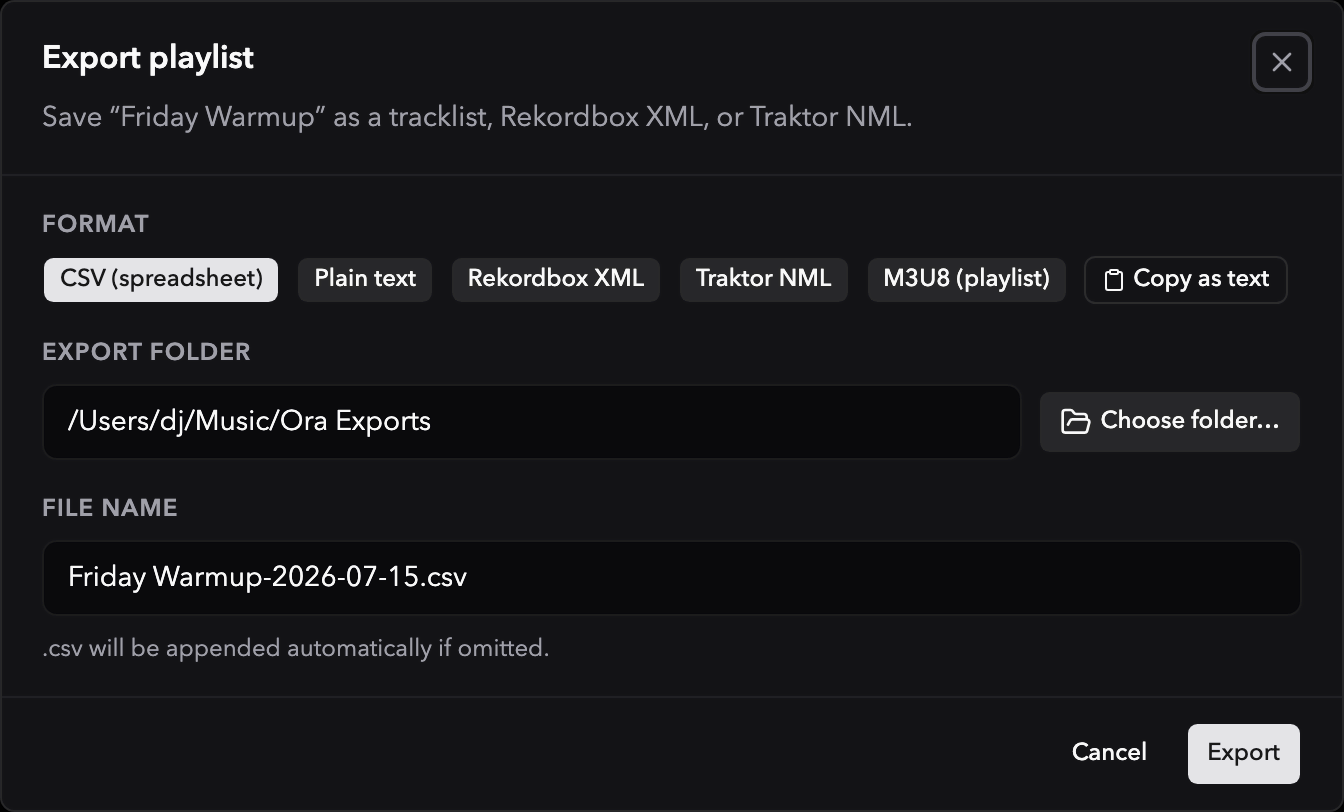
Ora remembers the last folder you exported to and offers it again next time. It cleans up the filename for you, swapping out any characters a filesystem won't accept and adding the right extension if you leave it off, and it creates the destination folder if it isn't there yet.
The file is named after the playlist and today's date, so a playlist called
Friday Warmup becomes Friday Warmup-2026-07-15.nml. Change the format and the
extension changes with it, keeping whatever name you typed.
Formats
A .csv spreadsheet with three columns: position, title, and artist. Fields are
quoted properly, so titles with commas or quotation marks survive the trip into
a spreadsheet app.
Note that CSV carries only position, title, and artist. BPM, key, and the other analysis fields are not included.
Traktor NML is for playlists only. Exporting a play session gives you CSV, plain text, Rekordbox XML, and M3U8.
Copy a tracklist
Sometimes you don't need a file at all. Press Copy as text in the export dialog and Ora puts the plain-text version, the same playlist name and numbered list, straight onto your clipboard, ready to paste.
Track order
Tracks export in the order they sit in the playlist, which is exactly the order you see in Ora's playlist view. What you arranged is what comes out.
A smart filter exports as a fixed list of whatever matches its rules at the moment you export. Export it again to refresh it.
A track you deleted from your library is left out of the export, in every format, even if the playlist still lists it. The positions close up around it.
To make club-ready copies of the files themselves rather than a list of them, see Prepare compatible copies.
Traktor export
Export your Ora DJ library, or a single playlist, as a Traktor file that Traktor reads with your tracks, cues, and playlists intact.
Prepare compatible copies
Make club-ready copies of a playlist or selection for a CDJ or XDJ. Ora DJ converts only the files that need it, keeps your cues and grids, and never touches the originals.