Record and review a mix
Record a mix, review its transitions, and export a track list or CUE sheet.
Select Internal mixing in Audio setup to record the Ora DJ master output.
Record a mix
- Select REC.
- Enter a name for the recording.
- Choose a format. Both platforms support WAV, AIFF, and FLAC. macOS also supports MP3 and M4A.
- Select Start recording.
- Select Stop when the mix is complete.
Wait for Ora DJ to finish saving the recording. Open Recordings in the sidebar to find it.
Review the set
In releases after v0.52.0, the set player shows the full waveform. Select a position on it to seek. The timeline shows the tracks on their deck lanes. Green bands mark transitions. Use the transition buttons to move between them. Select Whole set, 20 min, or 10 min to change the timeline range. The track list shows which tracks played and where they enter the mix.
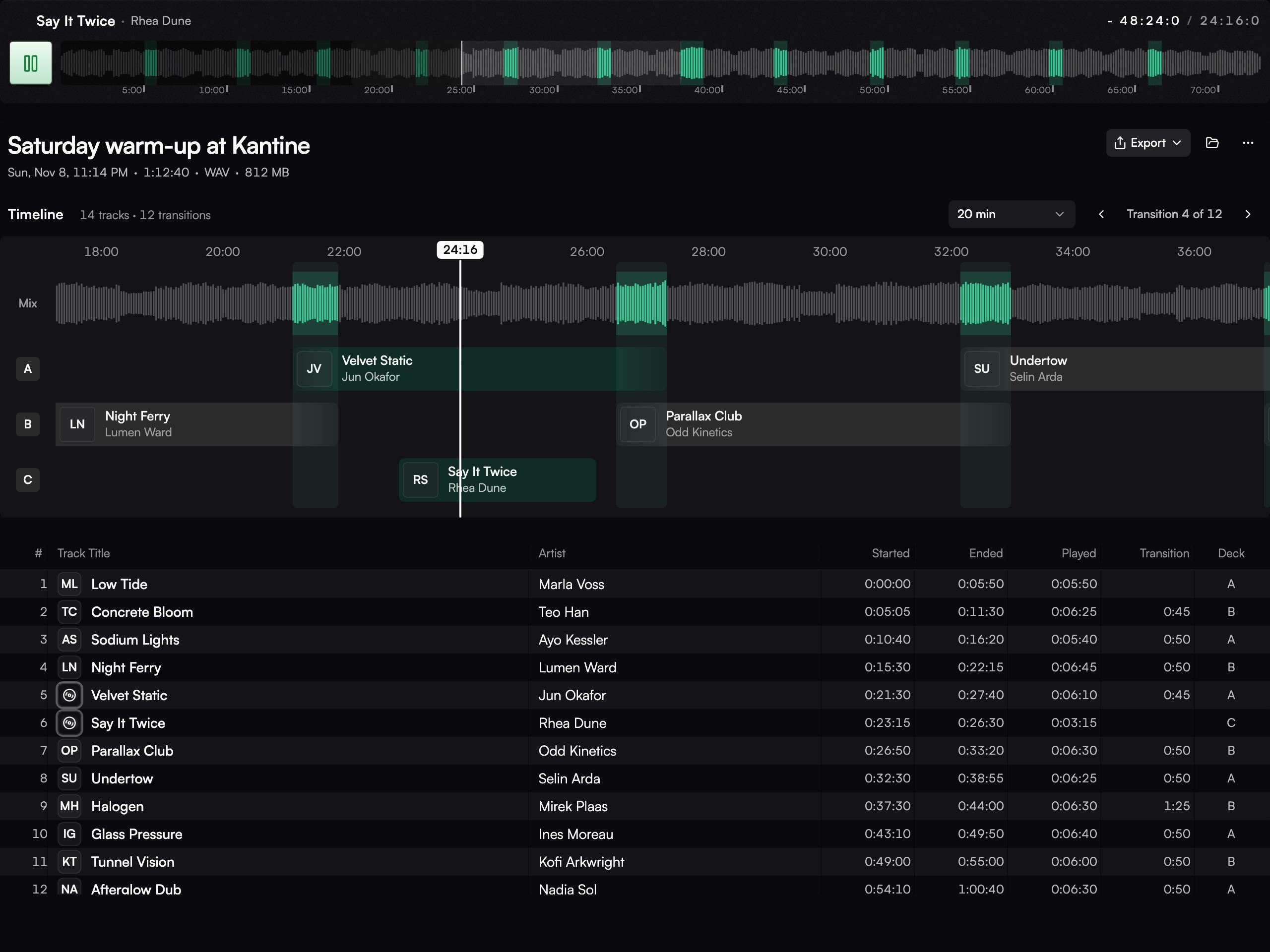
Export or reconnect
Select Export to save the track list or a CUE sheet. Use the folder button to find the recorded audio file. If you move the files, select Locate recording to reconnect them. When audio is missing, the saved track list can still be available.