
Camelot wheel for DJs
Made interactive
Hover or tap any key to light up every key that mixes with it harmonically. No signup, no reading music. Below the wheel you will find the full Camelot chart, the handful of rules that matter, and how to make your library do this for you.
Need the code for a track first? Analyze its BPM and key for free.
Want to know how the codes are worked out from the audio itself? Read how Ora DJ detects a track’s key.
Hover or tap a key to see what mixes with it.
Ora DJ tags your whole library with these codes.
What the Camelot wheel actually is
There are only twelve notes in all of Western music: C, C♯, D, D♯, E, F, F♯, G, G♯, A, A♯, B. Then it repeats. A key is a team of seven of those notes with one note as the captain, the note a melody keeps returning to and lands on when it feels finished. A bright-sounding team is a major key; a moodier one is a minor key. That is all the letters mean: B is major, A is minor.
A clash between two tracks is just their teams disagreeing. One song leans on F while the other insists on F♯, and the two notes grind until your ear flinches. Mixing in key means making the two teams overlap enough that nothing grinds. Music theory already knows which teams get along, but it writes the answer in a language that takes years to read. The Camelot wheel paints over that language with a number from 1 to 12 and a letter, and lays the keys out like a clock, so “do these two agree” becomes a position instead of a puzzle.
Same number, same notes
8B and 8A light up the exact same keys, because they are the same seven notes. Only the captain moves: C major calls C home, A minor calls A home. Nothing can clash, so this is a free mood swap, brighter or darker without touching the harmony. Hit play on each and you are hearing the same notes.
One step, a perfect fifth
Step one number and you move a perfect fifth, the distance from C to G. It is the friendliest gap between two notes there is: their sound waves line up so often that the ear hears the pair settle together instead of grinding. Keys a fifth apart share six of their seven notes; here only F becomes F♯. Watch that one black key light up instead of the white F. Six agree and one moves, so the blend stays smooth while that new note nudges the energy up. Step the other way and it eases down.
Keep stepping by fifths, C, G, D, A, E, and after twelve steps you have touched all twelve notes and arrived back home. Musicians call that loop the circle of fifths. The Camelot wheel is the same loop with the hard names painted over by numbers, which is why every rule below is really just a move on this one clock.
How to read a Camelot code
The number is the position
1 to 12, arranged like a clock. Neighbours on the wheel are a perfect fifth apart, so stepping one number keeps the two tracks in closely related keys.
The letter is the mood
A is a minor key, B is a major key. Same number, different letter means the relative major or minor: the same notes, a different feel.
So 8A is A minor
And 8B is C major. The wheel hands you 8A or 9B instead of a key signature, so the answer drops straight into how you already pick records.
The four moves that always work
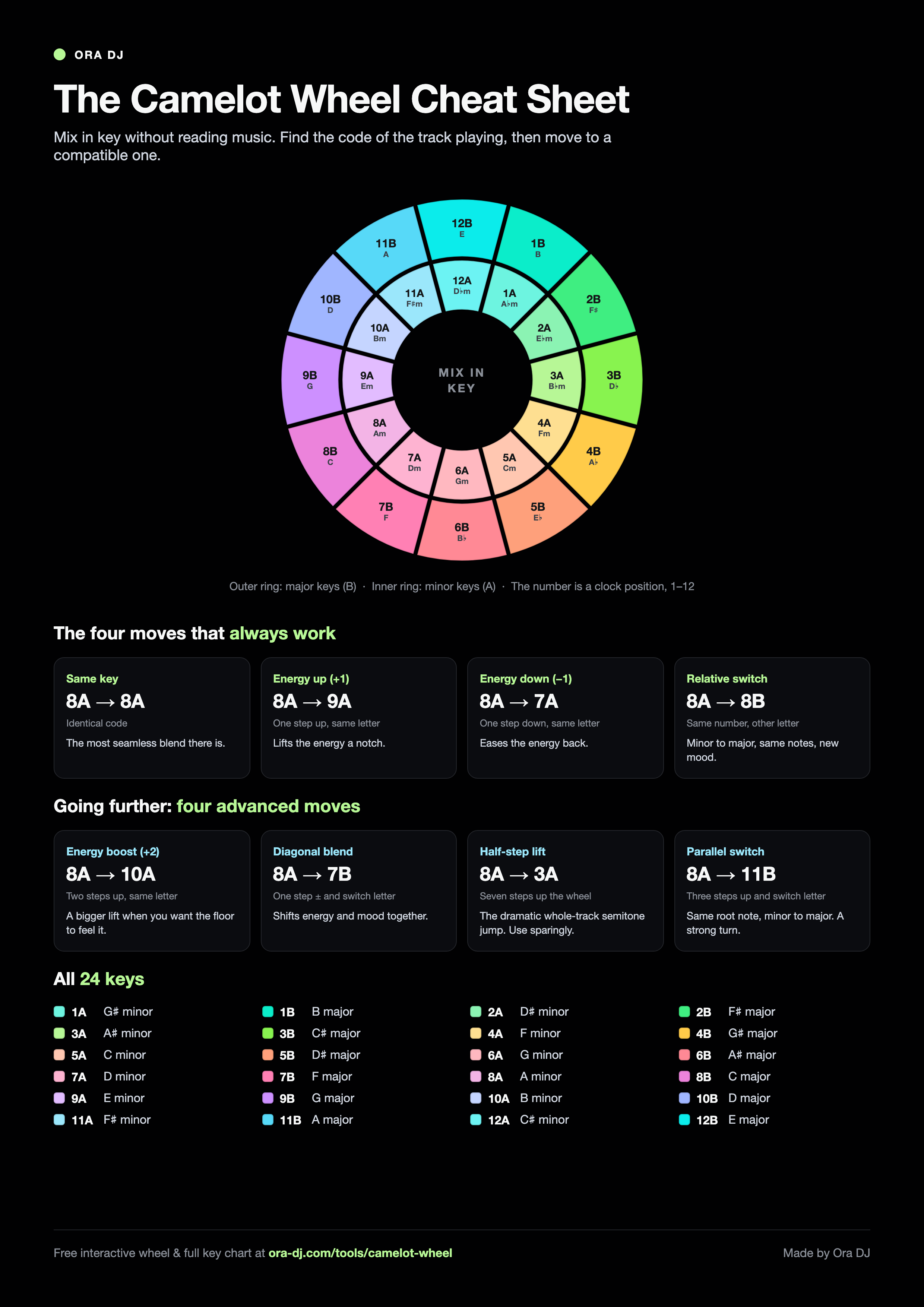
From whatever key is playing, four transitions stay harmonically safe. Take 8A as the example.
- 8A → 8ASame key
The safest blend of all: identical key.
- 8A → 9AEnergy up (+1)
One step clockwise lifts the energy.
- 8A → 7AEnergy down (-1)
One step back eases it down.
- 8A → 8BMood switch
Same number, other letter: minor to major.
Going further: four advanced moves
Once the safe moves are second nature, these push the energy or the mood harder. They take more care, but they are how a set builds tension and release. Each card shows the move from 8A; pick one and try it from any key on the wheel.
Pick a move, then hover or tap any key on the wheel to see it played from that key.
Showing Energy boost (+2). Hover any key to see where it lands.
Print the cheat sheet
The wheel, all eight moves, and every key on one page. Free to download, print, and pin above the decks.
Inside the analysis
What a key detector sees
A chromagram folds a track into twelve note classes. Time runs left to right, and stronger pitch energy rises and brightens. Move through ten illustrative patterns to see why some keys arrive cleanly while others stay open to argument.
Clear tonal centre
C minor · 5A
One pitch class keeps returning and rises above the rest.
Camelot key chart
All 24 keys, with the Camelot code and the musical key it stands for. The colours are the same ones Ora DJ uses to shade your library by key.
| Wheel | A (minor) | B (major) |
|---|---|---|
| 1 | 1AG# minor | 1BB major |
| 2 | 2AD# minor | 2BF# major |
| 3 | 3AA# minor | 3BC# major |
| 4 | 4AF minor | 4BG# major |
| 5 | 5AC minor | 5BD# major |
| 6 | 6AG minor | 6BA# major |
| 7 | 7AD minor | 7BF major |
| 8 | 8AA minor | 8BC major |
| 9 | 9AE minor | 9BG major |
| 10 | 10AB minor | 10BD major |
| 11 | 11AF# minor | 11BA major |
| 12 | 12AC# minor | 12BE major |
A few keys have two names that mean the same pitch (C# and D flat, for instance). The code stays the same either way.
Camelot wheel FAQ
What is the Camelot wheel?
The Camelot wheel is a simplified map of musical keys laid out like a clock. Every key gets a code, a number from 1 to 12 and a letter, so you can mix in key without reading music. Keys that sit next to each other on the wheel sound good together.
How do you use the Camelot wheel to mix in key?
Find the code of the track playing, then pick your next track from a compatible slot: the same code, one step up or down the same ring, or the other letter at the same number. Those moves keep two tracks in a related key so the blend sounds smooth instead of clashing.
Which keys are compatible on the Camelot wheel?
For any key, four moves are safe: the same key, one number up (energy up), one number down (energy down), and the same number with the other letter (the relative major or minor, a change of mood). For example, 8A mixes with 8A, 9A, 7A, and 8B.
What do the numbers and letters mean, like 8A?
The number is the position on the wheel, 1 to 12. The letter is the mode: A is a minor key, B is a major key. So 8A is A minor and 8B is C major. The two share a number because they are relative keys built from the same notes.
Do you have to mix in key?
No. Harmonic mixing is a tool, not a rule. Plenty of great transitions ignore key entirely, and a clash can be the point. The wheel just tells you which pairs are least likely to fight, which is a useful default when you are building the smooth stretches of a set.
Is the Camelot wheel the same as the circle of fifths?
Yes, the Camelot wheel is the circle of fifths with the musical key names replaced by numbers and letters. Both show the same relationships between keys. The circle of fifths uses C, G, D, and so on; the Camelot wheel uses 8B, 9B, 10B. The clockwise order and the harmonic moves are identical, so if you know one, you know the other.
Is there a Camelot wheel cheat sheet or printable chart?
Yes. Scroll down to the Print the cheat sheet section on this page. You can download the full Camelot wheel, all eight mixing moves, and every key on one page as a PNG or PDF, free to print and pin above your decks.
How does the Camelot wheel relate to Rekordbox?
Rekordbox detects the musical key of each track and can display it as a Camelot code (1A, 8B, etc.) instead of the key signature. You turn that on in preferences under Analysis. Once enabled, the key column shows the same Camelot codes this wheel uses, so you can filter your Rekordbox library by compatible keys the same way you use the wheel.
Let your library sort itself by key
Ora DJ reads the key of every track you import and tags it with its Camelot code, so you can filter, sort, and find compatible records without checking a chart. It is the same wheel above, built into the library you plan your sets from.